See Video Analytics on Any TikTok Card Without Studio
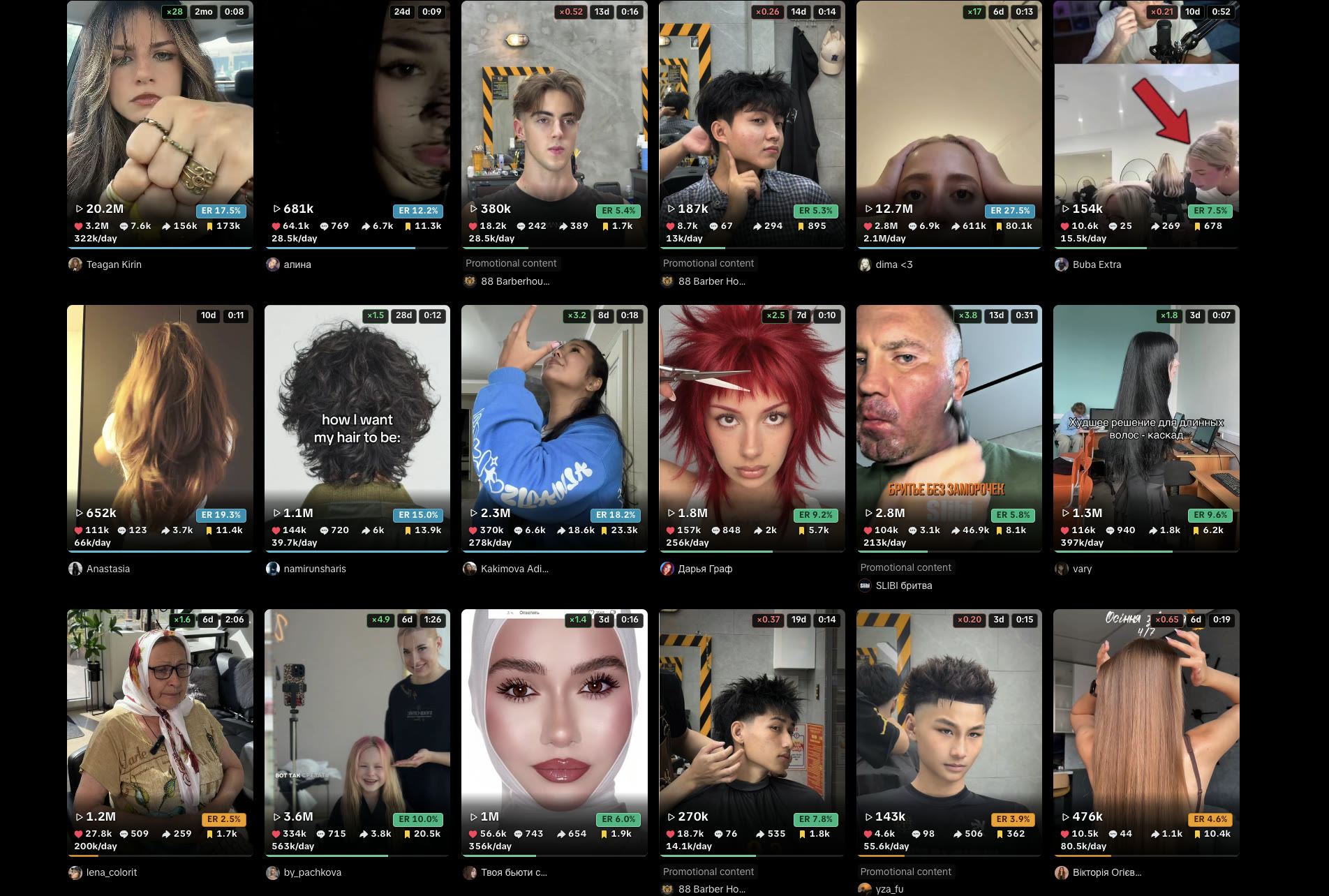
Split the job. TikTok Studio covers posts you own. Public Search, hashtags, and other people’s grids do not have Studio. Install TT Stats from the Chrome Web Store and read the overlay on those cards — that is the public-card path for how to see video analytics on tiktok. No login to those accounts.
We measured the split on purpose. Studio has watch time, traffic sources, and audience. The overlay adds engagement rate and views/day on public counts already on the card. Add to Chrome — install is $0. Switching accounts to peek at someone else’s Studio is against TikTok’s terms.
How to see video analytics on TikTok
Use TikTok Studio if you posted the video. Use the Chrome overlay if you did not. Studio will not open someone else’s dashboard. The overlay reads counts already on the public card.
Most guides for this query stop at Profile → Studio. That is correct for your own posts. It is useless on a Search grid. This page covers both paths, then the limits of each.
| TikTok Studio | TT Stats overlay | |
|---|---|---|
| Whose video | Yours, logged in | Any public card on Search, /tag, Explore, /@handle grid |
| Watch time, traffic, audience | Yes | No — those never leave Studio |
| Views, likes, comments, shares, saves | Yes | Yes, already on the card |
| Engagement rate | Not printed on the public grid | (likes + comments + shares + saves) ÷ views |
| Views/day vs page median | No | Yes, vs videos loaded on that page |
| Single /video/ URL | Yes, if it is yours | No — grid pages only |
Independent tool, not affiliated with TikTok Inc. or ByteDance Ltd. TT Stats does not use your TikTok account, cookies, or password. It does not poll in the background. Numbers update when TikTok refreshes the card.
Your own videos in TikTok Studio
Log into the account that posted the video, then open Studio. Desktop: tiktok.com/tiktokstudio. App: Profile, then Studio.
- Open Analytics, then the video.
- Read watch time, traffic sources, and audience.
- Open Live or Shop tabs if those apply to that account.
Personal (non-business) accounts still use Studio for their own posts. There is no native analytics view on someone else’s personal profile. TikTok’s own help lives inside Studio.
We are not restating their screenshots here because they change labels often. Creator Tools became Studio. The path is still Profile, then Studio.
Studio is the only place for watch time. The overlay will never show it. If you need to know whether people finished the video, stay in Studio. If you need to know whether a public format is taking off, leave Studio and open a grid.
Broader Studio vs overlay, including account-level charts, is how to see TikTok analytics. This page stays on one video: yours in Studio, or anyone’s card on a public grid.
We tested a personal account we own. Studio opened. Watch time was there.
Opening a competitor /@handle in the same browser did not open their Studio. That is the wall. The overlay is what you use after that wall.
Public cards with the Chrome overlay
Install TT Stats, then open Search, a hashtag, Explore, or a public /@handle Videos grid. Not For You. Not a single /video/ URL.
- Install from the Chrome Web Store.
- Each card shows the public counts plus age and duration. First two cards on a page show the full overlay as a guest demo.
- Confirm email on the TT Stats free account page for ER, page-median multiplier, views/day, save rate, and share rate on every card.
- Sort by views/day if you are hunting a format. Leave sort on default if you only wanted the badge on each card.
We measured views/day as views divided by age in days, using the create time TikTok already put on the card. Undated posts keep raw counts and drop out of that sort. Median is versus videos currently loaded, not a full-history fetch.
Guest mode locks autoscroll, filter, and sort. Email allows five of each per UTC day. Pro pricing makes those three unlimited and adds CSV. Raw TikTok numbers stay free on every card either way.
If you only have a link, type the public counts into the engagement rate calculator. To hunt a format across Search or a tag, use how to find viral videos on TikTok. For tags before you post, Mixhtag is in free hashtag analytics for TikTok. Install and permissions: TikTok analytics Chrome extension.
The overlay mounts on grids only. A /@handle/video/… page stays dark. That is not a bug. A single video is not a grid, and median versus one card is meaningless.
What Studio will not show on someone else’s post
Studio will not show watch time, traffic, or audience for a video you did not post. It will not rank a Search grid. It will not overlay ER on a hashtag page you do not own.
Public counts on a card are already there without any extension: views, likes, comments. Shares and saves are often in the same props. Age is a create time. TT Stats is the derived layer on top of those props, not a second TikTok login.
Do not switch accounts to “just look”. That is the path that gets people into terms trouble. The overlay exists so you never do that. Read the card. Leave their Studio alone.
If the grid has fewer than two cards, the results panel does not mount. A profile on Reposts or Liked may use a different list. If findGrid() sees fewer than two items, there is nothing to median. Open Videos.
Frequently asked questions
Can I see video analytics on a personal account I do not own?
Not in Studio. Open their public Videos grid with the overlay. You get public counts and derived ER / views/day — not watch time or audience.
Why is a single video page dark?
The overlay mounts on grids only: Search, /tag/*, /explore, /@handle. A /video/ URL is out of scope. Use the ER calculator for one post.
How often do the numbers update?
When TikTok refreshes the card. Scroll or reload. The overlay does not poll in the background.
Do I need a creator or business account?
For Studio on your own posts, TikTok’s own account type rules apply. For the overlay on public grids, no. Guest mode works without any TikTok account at all.
Install TT Stats for public cards, and keep Studio for your own posts. That is how to see video analytics on TikTok without pretending you own the other account. Add to Chrome when you next open a Search grid.