Find Viral TikTok Videos With Free Overlay Stats
Rank the grid you are already on by views per day. That is how to find viral videos on TikTok without TikTok Studio or a TikTok login. Install TT Stats from the Chrome Web Store and read the overlay on Search, a hashtag, Explore, or a public profile grid.
Lifetime views hide age. A year-old clip with a huge count is not taking off this week. We measured daily views as views ÷ days since the post, on cards TikTok already rendered. Add to Chrome — the install is $0.
How to find viral videos on TikTok
Open a public grid in Chrome, then sort the loaded cards by views per day. Skip For You. That feed is personalised to you, not a niche sample you can rank.
TT Stats reads React props TikTok already used to paint the grid. It does not scrape in the background. It does not send video data to our servers. Independent of TikTok Inc. and ByteDance Ltd.
- Install TT Stats from the Chrome Web Store. There is no build step. Load it in Chrome 111 or newer.
- Go to tiktok.com. Open Search, a hashtag page, Explore, or a public
/@handleVideos grid. Do not open For You, Following, or a single/video/URL. - Raw counts show on every card: views, likes, comments, shares, saves, age, duration. The first two cards on that page show the full overlay as a guest demo.
- Confirm email on the TT Stats free account page. That turns on engagement rate, page-median multiplier, views/day, save rate, and share rate on every loaded card.
- Sort by views/day. Posts well above that page’s median are the breakouts. Filter by a views range if the grid is noisy.
- Open the creator’s Videos tab if a post is still moving. Median there is versus posts loaded on that profile, not a hidden full-history fetch.
Guest mode is enough to see whether the overlay mounts. Email mode is enough to research a niche for a day. Pro pricing removes the daily caps on autoscroll, filter, and sort, and adds CSV.
We tested guest, email, and Pro on the same Search URL. Guest kept sort, filter, and autoscroll locked. Email allowed five of each per UTC day. Pro did not cap those three. That split is the product, not a trial countdown.
Why lifetime views hide what is taking off
Sort by lifetime views and you get last year’s catalogue. Views/day is views ÷ days of age. A fresh clip with a smaller total outranks a stale clip with a larger total.
We measured this on cards that already had a create time in TikTok’s own props. Posts with no date drop out of the freshness mix. They still show raw counts. They do not enter the views/day sort.
| Signal | What it answers | What it hides |
|---|---|---|
| Lifetime views | How big the post ever got | Whether it is still moving |
| Likes | Who tapped heart | Saves and shares, which travel further |
| Views/day | Velocity while the post is aged | Watch time (Studio only) |
| Page median | Outlier vs this grid, right now | The creator’s all-time baseline |
Page median is the boring number that makes a breakout obvious. A post at 1.7 times this page’s median views is a hit on a big Search grid even if raw engagement rate looks modest. The same post on a tiny tag page may be average. Always read the multiplier against the grid you loaded.
Engagement rate on the overlay is (likes + comments + shares + saves) ÷ views. Same formula as the TikTok engagement rate calculator. TikTok Studio does not print that ratio on a public Search card.
Save rate and share rate are saves ÷ views and shares ÷ views. We tracked save rate as the early tell on formats that later travel. A high-save post with modest views is often a better copy target than a high-view post with no saves.
Search, Creative Center, and the overlay
Use Search, a hashtag, or Explore when you want a public sample. Use TikTok Creative Center when you want ads trends. Use TikTok Studio when the video is yours.
| Surface | What you see | Limit |
|---|---|---|
| For You / Following | A personalised feed | Not a niche sample. TT Stats does not mount here. |
| TikTok Search / tag / Explore | Public cards you can overlay | Median is vs videos currently loaded. |
| TikTok Creative Center | Official ads trends, hashtags, songs | Not post-level ER or views/day on a Search grid. |
| TikTok Studio | Watch time, traffic, audience for your posts | Only the account you are logged into. |
| TT Stats overlay | Views/day, ER, save rate, share rate, page median | No watch time. No audience. Grid pages only. |
Third-party “viral finders” scrape TikTok and sell a dashboard. TT Stats never leaves the page. If the card is not on screen, it is not in the rank. Scroll or autoscroll to load more. The panel recounts.
Autoscroll is a page-count control: 1, 2, 3, 5, or 10 pages, default 3, stored in sessionStorage. Email gets five autoscroll runs per UTC day. Guest gets none. We ran the default of 3 on long Search result lists so CSS order had enough cards to show a sort.
Sort uses CSS order on the grid TikTok already built. It does not appendChild reorder. TikTok wraps cards; moving nodes breaks the feed. If a live grid is block or multi-column, the overlay forces flex wrap so order is visible. That is a layout patch, not a TikTok API.
For Studio on an account you own, read how to see TikTok analytics in Studio. For one public card vs Studio, read how to see video analytics on TikTok. For tags before you post, use Mixhtag in free hashtag analytics for TikTok.
What TT Stats ranks on a loaded grid
The overlay ranks cards that are on the page right now. It does not fetch the creator’s full history. It does not invent missing dates.
- Views/day — views ÷ age in days. Undated posts omitted from this sort.
- Engagement rate — likes + comments + shares + saves, divided by views.
- Save rate and share rate — each divided by views.
- Page median — this grid’s middle, not a global TikTok baseline.
- Breakouts — cards well above that median on the current load.
Guests see public counts on every card and full computed metrics on the first two. A free account turns on the math on the whole grid, plus five autoscrolls, five filters, and five sorts per day. Pro makes those three unlimited and adds CSV with a BOM so Excel opens UTF-8.
The in-page panel sits above the grid. The sidebar repeats the same table. Both show median views, median ER, median save rate, median share rate, median views/day, and breakout count. Filter and sort live in that chrome. They stay gated for guests.
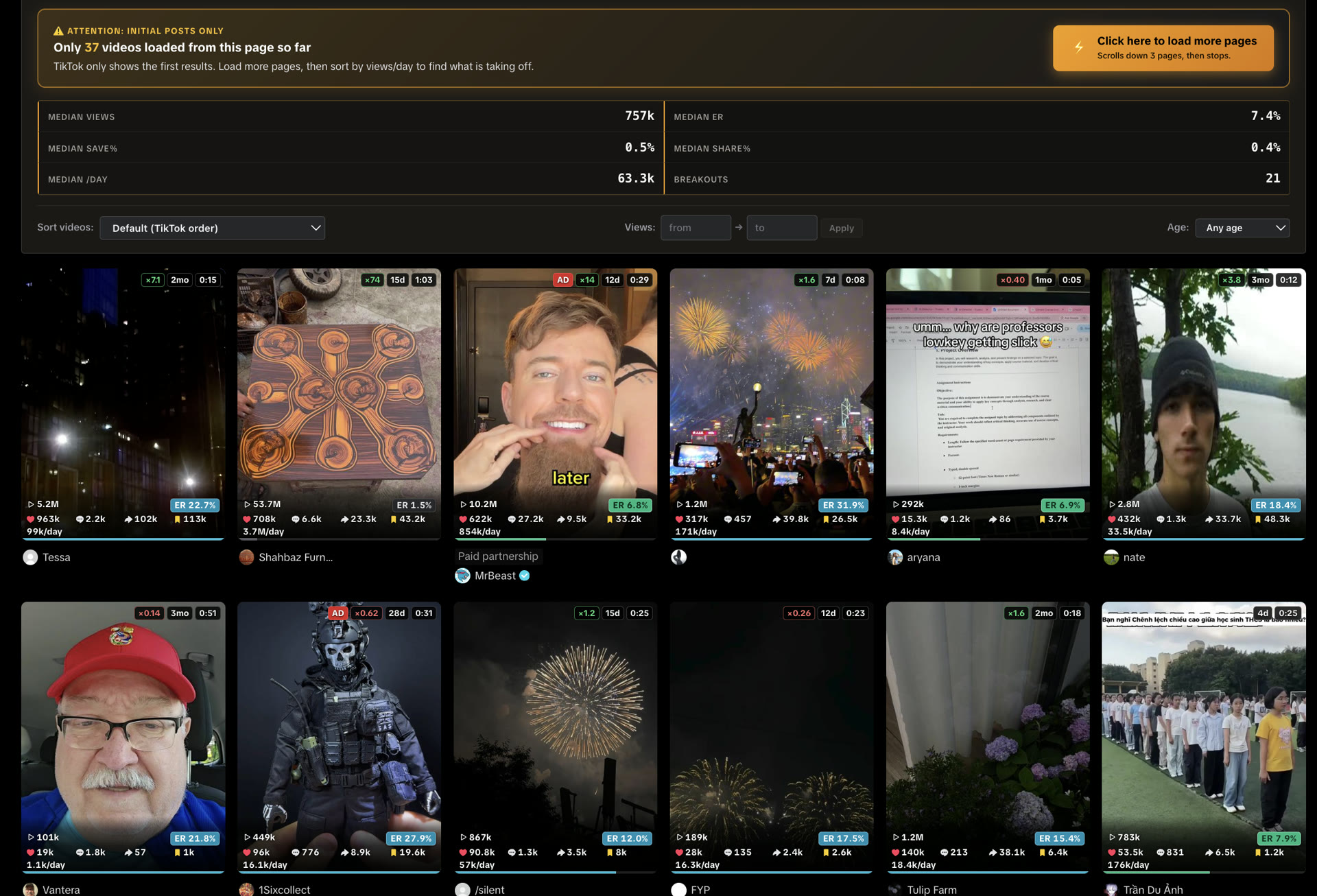
The walkthrough for install, permissions, and what “free” means is the TikTok analytics Chrome extension page. This page is the research method. That page is the listing.
After you mark a hit, open /@handle Videos. Same overlay. Same median-vs-loaded-posts rule.
A /@handle/video/… page stays dark on purpose. One URL is not a grid. Type that post into the engagement rate calculator if you only have a link.
Frequently asked questions
How can I find viral clips?
Search a niche or open a tag. Overlay views, ER, saves, shares, and views/day. Sort by views/day. Breakouts sit well above the page median.
Do I need a TikTok login?
No. TT Stats does not use your TikTok account, cookies, or password. It reads counts already on the public grid.
Why not sort by lifetime views?
Old catalogue clips dominate lifetime views. Daily views factor in age, so a fresh post outranks a stale larger post.
Does the overlay fetch every video the creator ever posted?
No. Median is versus videos currently loaded on that page. Scroll or autoscroll to load more. The panel recounts.
Does the overlay work on For You?
No. It mounts on Search, hashtags, Explore, and public profile grids. For You and Following stay dark.
Install TT Stats, open a public grid, and sort by views/day. That remains how to find viral videos on TikTok without switching accounts. Add to Chrome when you want the overlay on the next Search.
- Install TT Stats from the Chrome Web Store. Open Search, a hashtag, or Explore.
- Sort the loaded cards by views/day. That is how to find viral videos on TikTok on a public grid, without a TikTok login.