How to See TikTok Analytics
Two jobs. Your own account lives in TikTok Studio. Public Search, hashtags, Explore, and profile grids do not — that is what the Chrome overlay is for.
Your account — TikTok Studio
Native analytics: views, audience, traffic sources, Live, Shop. Only for the account you are logged into. Free. The right tool when you are the creator.
Public grids — Chrome overlay
Public counts on every Search, tag, Explore, or profile-grid card, plus engagement rate and median vs that page. No login to those accounts. The right tool when you are hunting a niche or a format.
How to see your TikTok analytics in Studio
- Log into the TikTok account you own.
- On desktop, open tiktok.com/tiktokstudio. In the app: Profile, then Studio.
- Open Analytics. You get views, audience, traffic sources, and Live or Shop data for that account.
That is the full native answer to “how to see my TikTok analytics.” Studio will not show another creator’s dashboard. Switching accounts to peek is against TikTok’s terms and still does not give you post-level ER on a grid.
How to check TikTok analytics on Search and hashtags
- Install the TikTok analytics Chrome extension from Chrome Web Store.
- Open Search, a hashtag, Explore, or a public profile grid on tiktok.com.
- Each card shows views, likes, comments, shares, saves, age, and duration. The first two posts on a page show the full overlay as a permanent demo.
- Confirm email on this site to unlock engagement rate, page-median multiplier (×1.7), views/day, and the results panel on every card.
The extension reads React props TikTok already used to render the grid. It does not log into their account, does not scrape in the background, and does not send video data to our servers.
How to check TikTok analytics on PC
Both paths work in a desktop browser. Studio: Chrome or Edge, logged into tiktok.com. Overlay: Chrome, any public URL on tiktok.com, no account switch. Mobile Studio exists in the app; the overlay is Chrome-only.
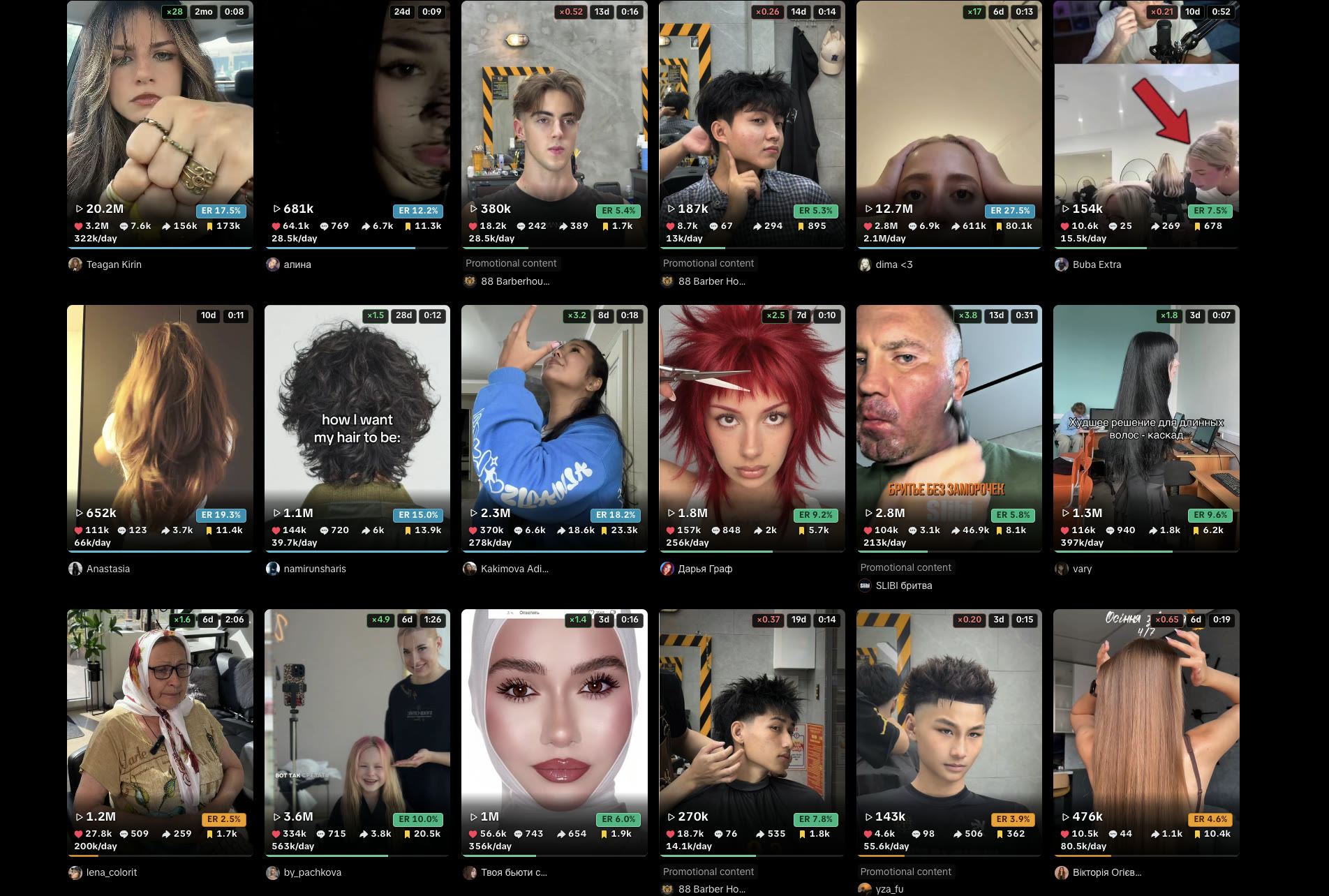
What Studio will not show you
Engagement rate as (likes + comments + shares + saves) ÷ views is not printed on the public grid. For one video, use the engagement rate calculator. For a whole grid, the overlay does the same math on every card. Post-level vs Studio: how to see video analytics on TikTok. Hunting a format: how to find viral videos.
Frequently Asked Questions
How do I see my TikTok Analytics?
For your own account, open TikTok Studio on the web or in the app (Profile → Studio). To see analytics on any public channel, install the Chrome overlay: views, engagement rate, medians, and channel summaries on video cards.
How to check TikTok analytics on PC
In Chrome, log into tiktok.com and open TikTok Studio for your own account. For any public profile, install the overlay and open that profile — no account switch.
What does TikTok Analytics track?
Studio tracks your own views, audience, traffic sources, and Shop or Live data. The overlay adds post-level engagement rate, median vs. channel, views per day, and a channel summary on profiles you do not own.
How often does TikTok analytics update?
Studio refreshes on TikTok’s side. The overlay reads numbers already on the page, so it updates when you refresh or scroll. It does not poll TikTok in the background.
How to see analytics on tiktok personal account
Personal accounts still use Studio for their own data. There is no native analytics view on someone else’s personal profile. The overlay reads public counts already on the grid.